

On the AWS side
Enable IAM database authentication on the RDS instance or Aurora cluster. MySQL, MariaDB, and PostgreSQL all support it. Then create the database user:- MySQL / MariaDB
- PostgreSQL
Import from AWS
Choose File > Import > Import from AWS… and the endpoints come from the AWS API instead of the console. The profile needsrds:DescribeDBInstances and rds:DescribeDBClusters, both in the AmazonRDSReadOnlyAccess policy.
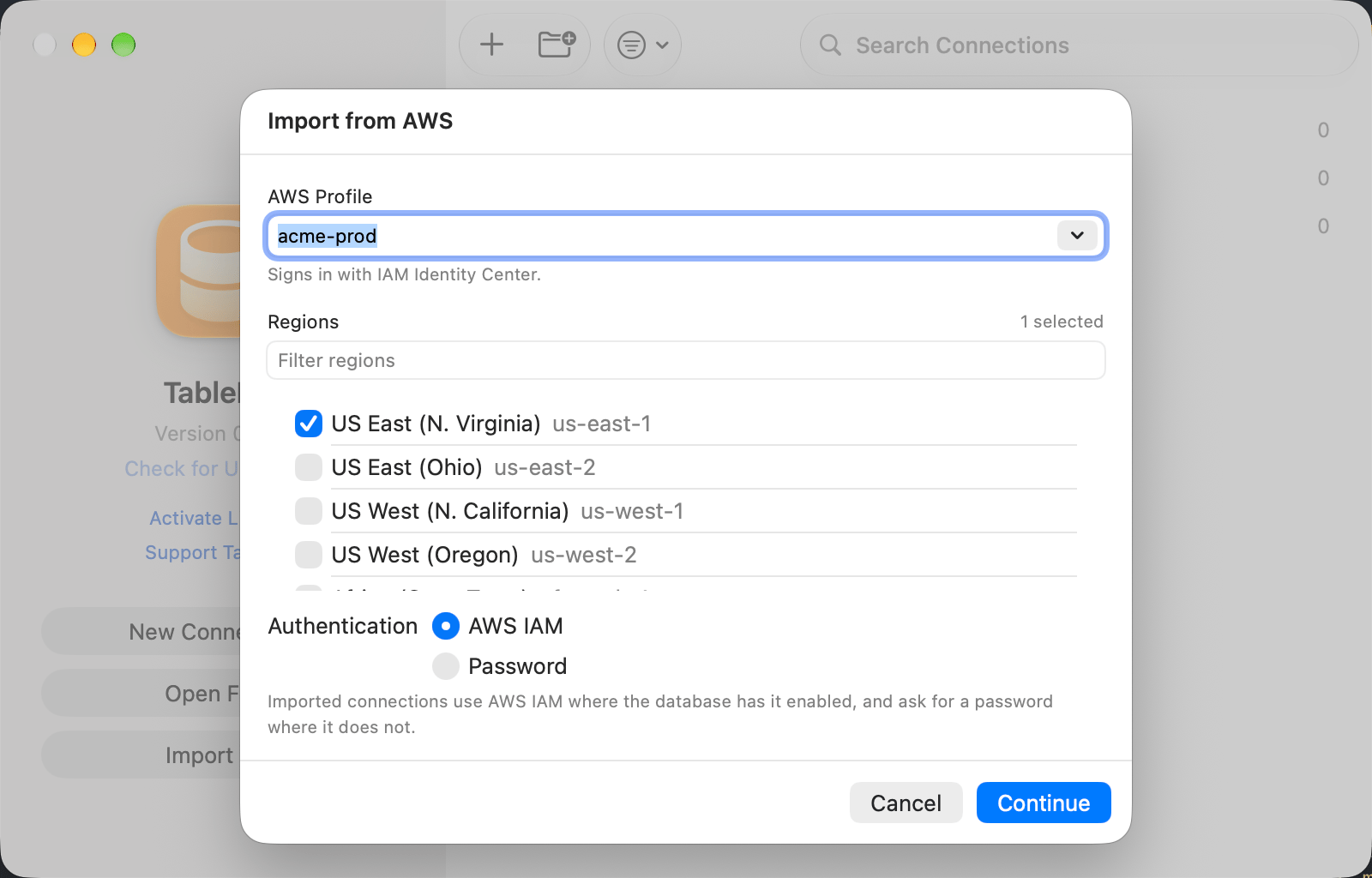
Regions are searched in parallel, four at a time
1
Pick a profile
The list holds the profiles in
~/.aws/config and ~/.aws/credentials, and the line under it names how that one signs in. An expired IAM Identity Center session offers Sign In here.2
Pick regions
AWS has no default region, so Continue stays dimmed until at least one is selected. The profile’s own
region starts selected.3
Review and import
Every instance and cluster arrives as a row with its endpoint, port, and engine. A cluster brings its writer endpoint, and its reader endpoint as a second row that starts deselected.
Setting up
In the connection form, set Authentication to one of the AWS IAM options. The Password field gives way to the AWS fields, and Username takes the IAM database user.
AWS IAM options in the connection form
Pick AWS IAM (Profile) if you already use the AWS CLI here: it reads the same files the same way.
AWS Region is read from the endpoint when the hostname looks like
mydb.abc123.us-east-1.rds.amazonaws.com. Fill it in for a CNAME or any other custom endpoint, or to override what was detected.
Token lifetime
Each connect signs a fresh token, valid for 15 minutes and never written to disk; automatic reconnects sign another. Nothing to paste, rotate, or refresh. IAM also requires encryption in transit, so an SSL mode of Disabled or Preferred is raised to Required for the connect.Profiles
Profile Name lists the profiles found in~/.aws/config and ~/.aws/credentials and accepts a typed name. Blank means default. A profile resolves by what it declares, the way the AWS CLI resolves it, so AWS IAM (Profile) and AWS IAM (SSO) reach the same profiles:
role_arnassume-role profiles, resolved through STS. Base credentials come fromsource_profile, chaining up to five deep and resolving that profile by its own kind, or fromcredential_source = Environment.mfa_serialis not supported.- IAM Identity Center profiles, through
sso_sessionor the older inlinesso_start_url, using the token cache in~/.aws/sso/cache. - Static
aws_access_key_id/aws_secret_access_keypairs. credential_processcommands, so a profile can be backed by 1Password or any other credential helper.
web_identity_token_file is not supported and says so rather than reporting the profile incomplete.
A connect that fails on an expired IAM Identity Center session offers the browser sign-in; aws sso login --profile <name> does the same from the shell.
Tunnels and port forwards
RDS checks the token against its own hostname and port, so the endpoint it was signed for is what matters, not the address dialed. A tunnel the app opens needs nothing extra: the token is signed for the Host and Port in the form, not the loopback address the driver gets. A forward you run yourself leaves127.0.0.1 in the form, which names no database. Set RDS Endpoint to the real one:
Troubleshooting
Could not determine an AWS region for ”…”
The hostname is not a standard RDS endpoint. Fill in AWS Region.TablePro cannot sign an RDS token for ”…”
The connection points at a port forward the app did not open. Fill in RDS Endpoint with the endpoint from the AWS console.PAM authentication failed
PostgreSQL reports this and MySQL reportsAccess denied when the token was signed for the wrong endpoint. Check RDS Endpoint against the console, including the port.
Profile ”…” was not found
The profile declares no credentials at all: norole_arn, no sso_session or sso_start_url, no static keys, and no credential_process. Check the name and the contents of ~/.aws/config and ~/.aws/credentials.
AWS SSO Sign-In Required
The cached SSO session expired. Accept the prompt, or runaws sso login --profile <name>.